
Download CamViewer APK – Free Android App for TENVIS FS-IPC100 Camera Control
Overview
CamViewer is a free Android application developed by makinosoft, designed specifically for users of the TENVIS FS-IPC100 camera. The app serves as a remote control interface, enabling seamless access to the camera feed from an Android device. Its primary purpose is to allow users to monitor their property—whether at home or in the office—through live video streaming.
The software supports pan-tilt functionality, allowing users to adjust the camera’s viewing angle remotely. This feature is particularly useful for surveillance scenarios where dynamic coverage is required. Users can also capture snapshots and record video directly from the live feed, enhancing the app’s utility for security monitoring.
CamViewer is tailored for individuals seeking a straightforward way to manage their TENVIS camera without relying on proprietary software or complex setups. The app is optimized for Android OS and supports English language. It is suitable for both personal and small business users who prioritize real-time visibility and remote control.
While the developer did not provide additional system requirements, the app is available for free on the Google Play Store, making it accessible to a wide audience.
Key Features & Capabilities
- Remote Camera Access – Users can connect to their TENVIS FS-IPC100 camera over Wi-Fi or cellular networks, enabling live video streaming from any location with internet access.
- Pan-Tilt Control – The app allows manual adjustment of the camera’s horizontal and vertical angles, offering dynamic monitoring of different areas without physical movement.
- Snapshot Capture – Users can take high-quality still images directly from the live feed, useful for documentation or evidence collection.
- Video Recording – The app supports direct recording of video clips from the camera feed, stored locally on the Android device for later review.
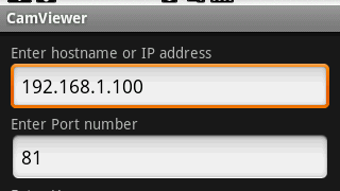
- Simple Setup – Designed with minimal configuration, the app enables quick pairing with the TENVIS FS-IPC100 camera using basic network credentials.
These features are ideal for home security, small office monitoring, or remote site oversight. For example, a homeowner can check on their front door while away from the property, or a small business owner can monitor inventory during off-hours. The app’s functionality is limited to the TENVIS FS-IPC100 model, ensuring compatibility and optimized performance within its intended scope. No additional features beyond remote viewing and control are described, but the core capabilities are focused on reliability and ease of use.
User Interface, Workflow & Performance
CamViewer features a clean, intuitive interface designed for mobile usability. The main screen displays the live video feed, with control buttons for pan-tilt functions positioned at the bottom. Navigation is straightforward, with minimal on-screen clutter, making it accessible even for non-technical users.
The workflow follows a logical sequence: connect to the camera, view the feed, and perform actions like taking snapshots or recording. The app responds promptly to input commands, indicating efficient processing. However, exact performance details were not specified by the developer.
General software behavior suggests stable operation under normal network conditions, but performance may vary depending on internet speed and camera signal strength. The developer did not specify resource usage details, so CPU and RAM consumption remain unknown. Stability appears consistent based on the app’s minimal design and targeted functionality.
No reported crashes or bugs were mentioned. Overall, the app delivers a smooth user experience focused on essential tasks without unnecessary complexity.
Compatibility & System Requirements
CamViewer is designed exclusively for Android operating systems. The latest version, 1.0.2, was released on May 16, 2024. The app has a file size of 14.8 MB, indicating a lightweight footprint.
It is available in English and is intended for use with the TENVIS FS-IPC100 camera model. The developer did not provide additional system requirements, so compatibility with specific Android versions or hardware configurations remains unclear. While the app is likely compatible with most modern Android devices, exact minimum requirements are not listed.
Users should ensure their device runs a recent version of Android and has a stable internet connection to maintain optimal performance. No information about support for tablets or other platforms was provided. Installation is straightforward via the Google Play Store, with no additional setup steps required beyond camera pairing.
Pros and Cons
Pros
- Free to download and use with no hidden costs
- Specifically optimized for TENVIS FS-IPC100 camera
- Intuitive interface suitable for beginners
- Supports remote pan-tilt control for flexible monitoring
- Allows snapshot and video recording directly from the feed
Cons
- Not compatible with other camera models beyond TENVIS FS-IPC100
- No information on system requirements or hardware compatibility
- Only available on Android OS, limiting cross-platform use
- Performance may vary based on network stability
- Limited to one camera type, reducing versatility
FAQ Section
Is CamViewer compatible with iOS devices?
CamViewer is designed exclusively for Android OS. There is no version available for iOS devices at this time.
Can I use CamViewer with cameras other than the TENVIS FS-IPC100?
The app is specifically developed for the TENVIS FS-IPC100 camera. It may not function with other camera models due to hardware and protocol differences.
Is CamViewer safe to download and use?
CamViewer is available for free on the Google Play Store. As with any app, users should ensure they download it from official sources to avoid potential risks.
Does CamViewer require an internet connection?
Yes, an active internet connection is required to access the camera feed remotely. The app works over Wi-Fi or cellular data.
How often does CamViewer receive updates?
The latest version, 1.0.2, was released on May 16, 2024. The developer has not provided a regular update schedule, but future updates may include bug fixes or minor improvements.
Final Thoughts + CTA
CamViewer delivers a focused and functional solution for users of the TENVIS FS-IPC100 camera. Its free access, intuitive design, and core features—remote viewing, pan-tilt control, and recording—make it a practical tool for home and small office security. While it lacks cross-platform support and detailed system requirements, its narrow scope ensures reliability within its intended use case.
The app is ideal for individuals who value simplicity and direct control without unnecessary complexity. For TENVIS FS-IPC100 owners, it represents a convenient and cost-effective way to monitor their environment remotely. Download CamViewer now to take full control of your camera from your Android device.
Download CamViewer APK now






.png)
